Overview
MineTrick - A competitive 4v4 PvP minigame where two teams battle to collect 7 gems and claim victory!
Key Features
- 4v4 Team Battles: Two teams of 4 players fight for supremacy
- Gem Collection: First team to collect 7 gems wins
- Strategic Combat: Kill enemies to put the gems back inside the chests
- Multiple Arenas: Create and manage multiple game arenas
- Auto-Start: Games start automatically when enough players join
- Player Stats: Track wins, kills, deaths, and gems collected
- Fully Customizable: Configure game duration, equipment, and gameplay rules
- Join Signs: Interactive signs for easy game joining
Requirements
- Minecraft: 1.18.2+
- Server: Spigot/Paper
- Java: 17+
How to Play
Objective
Be the first team to collect 7 gems (diamonds) to win the game!
Gameplay Loop
- Join: Use /mt join or click a join sign
- Wait: Game starts when 4+ players join (minimum configurable)
- Collect Gems: Find gems in chests scattered across the arena
- Fight: Eliminate opponents to steal their gems
- Win: First team to 7 gems wins!
Game Rules
- Each player spawns with a sword, bow, arrows, and shield
- When you die, you drop your collected gems
- Dropped gems respawn in random chests after being collected
- Respawn after 5 seconds (configurable)
- No friendly fire - you can't hurt your teammates
- Game duration: 5 minutes (configurable)
- Overtime if tied: 5 minutes (configurable)
Player Commands
/mt help
Show all available commands
/mt join
Join a random available game
/mt join <game-name>
Join a specific game
/mt spectate <game-name>
Spectate a specific game
/mt unspectate
Stop spectating
/mt leave
Leave current game
/mt lobby
Return to main lobby
/mt stats <player>
View a specific player's statistics
/mt stats
View your statistics
Party Commands
/mt invite <player>
Invite a player to your party
/mt accept/deny
Accept an invitation or deny it
/mt party leave
Leave a party
/mt party kick <player>
Kick a player from your party
/mt party list
List all members in your party
Admin - Setup
Initial Setup
/mt setmainlobby
Set the main lobby location where players spawn
Creating an Arena
/mt create <game-name>
Create a new game arena
/mt setlobby <game-name>
Set the waiting lobby for this game (where players wait before start)
/mt addspawn team1 <game-name>
Add a spawn point for Team 1 (BLUE Team). Can add multiple spawns.
/mt addspawn team2 <game-name>
Add a spawn point for Team 2 (RED Team). Can add multiple spawns.
/mt addchest <game-name>
Add a chest location where gems can spawn. Add multiple chests across the arena.
Managing Games
/mt list
List all game arenas with their current status
/mt delete <game-name>
Delete a game arena
/mt delete <game-name>
Delete a game arena
/mt sethologram
Set the scoreboard hologram location
/mt setlobbyhologram <game-name>
Set the lobby hologram location for a game
/mt updatehologram
Update the scoreboard hologram with current game stats
Admin - Advanced
Game Control
/mt start <game-name>
Force start a game (bypasses minimum player requirement)
/mt stop <game-name>
Force stop a running game
Zone Control
/mt pos1 <game-name>
Set the first corner of a zone
/mt pos2 <game-name>
Set the second corner of a zone
Configuration
Edit the config.yml file to customize game settings:
- minPlayers: Minimum players to start (default: 4)
- maxPlayers: Maximum players per game (default: 8)
BungeeCord Setup
MineTrick supports full BungeeCord integration with two modes: Hub Mode and Game Mode.
Prerequisites
- BungeeCord/Waterfall proxy server
- Multiple Spigot/Paper servers connected to BungeeCord
- In each server's
spigot.yml, set:bungeecord: true
Mode 1: Hub Mode
Use one server as a hub where players can join, and redirect them to dedicated game servers.
Configuration (config.yml on hub server):
bungee:
  enabled: true
  mode: hub
  custom-motd: true
  game-servers:
    arena1: game-server-1
    arena2: game-server-2
    arena3: game-server-3
How it works:
- Players join the hub server
- When they use
/mt join arena1or click a sign, they're sent togame-server-1 - Each game server runs its own instance of MineTrick
- The hub server displays statistics from all game servers in the MOTD
Mode 2: Game Mode
Use dedicated servers for specific games, with automatic hub return.
Configuration (config.yml on game server):
bungee:
  enabled: true
  mode: game
  custom-motd: true
  hub-server: lobby
  auto-join-game: arena1
  return-delay-seconds: 5
How it works:
- Players are sent to this server from the hub
- They automatically join the configured game (
arena1) - After the game ends, they're sent back to the hub server after 5 seconds
- No need to configure a main lobby on game servers
Custom MOTD
The plugin can display dynamic game information in the server list:
Hub Mode MOTD:
Shows: Number of waiting/active games and total players
Game Mode MOTD:
Shows: Game status (Open, Starting, In Progress) and player count
Configure MOTD messages in messages.yml:
bungeecord.motd.hub.line1: "&b&lMineTrick Network"
bungeecord.motd.hub.line2: "&7{waiting} waiting | {active} active | {players} players"

bungeecord.motd.game.line1: "&b&lMineTrick &7- &f{game}"
bungeecord.motd.game.waiting: "&aOpen &7- &f{players}/{max} players"
bungeecord.motd.game.starting: "&eStarting... &7- &f{players}/{max}"
bungeecord.motd.game.active: "&cIn game &7- &f{players}/{max}"
Complete Configuration Reference
| Option | Description | Default |
|---|---|---|
| bungee.enabled | Enable BungeeCord mode | false |
| bungee.mode | Mode: "hub" or "game" | game |
| bungee.custom-motd | Enable custom server list MOTD | true |
| bungee.hub-server | BungeeCord server name for hub (game mode) | hub |
| bungee.auto-join-game | Game to auto-join on connect (game mode) | "" |
| bungee.return-delay-seconds | Delay before returning to hub after game | 5 |
| bungee.game-servers | Map game names to server names (hub mode) | {} |
Setup Steps
For Hub Mode:
- Install MineTrick on your hub server
- Enable BungeeCord in
config.ymlwithmode: hub - Configure
game-serversmapping - Create join signs or let players use
/mt join <game> - Players will be redirected to the appropriate game server
For Game Mode:
- Install MineTrick on each game server
- Enable BungeeCord in
config.ymlwithmode: game - Set
hub-serverto your hub's BungeeCord name - Set
auto-join-gameto the game name on this server - Create and configure the game arena normally
- Players sent to this server will auto-join the game
⚠️ Important Notes
- Make sure
bungeecord: trueis set inspigot.ymlon ALL servers - BungeeCord server names must match exactly (case-sensitive)
- In game mode,
setmainlobbyis not required - Test the configuration with
/mt reloadto see BungeeCord status in console
Permissions
| Permission | Description | Default |
|---|---|---|
| minetrick.join | Join games | true |
| minetrick.leave | Leave games | true |
| minetrick.spectate | Spectate games | true |
| minetrick.stats | View statistics | true |
| minetrick.admin | Access all admin commands | op |
| minetrick.create | Create games | op |
| minetrick.delete | Delete games | op |
| minetrick.setup | Setup arenas (spawns, chests, lobby) | op |
| minetrick.start | Force start games | op |
| minetrick.stop | Force stop games | op |
Join Signs
Create interactive signs that players can click to join games!
How to Create a Join Sign
- Place a sign anywhere
- On the first line, write:
[MineTrick] - On the second line, write the game name:
<game-name> - Leave the third and fourth lines empty
Example:
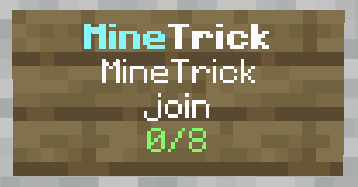
The sign will automatically update with:
- Current game status (Waiting, Starting, Active)
- Player count (X/8)
- Color coding based on status
Game Mechanics
Team System
- Team 1 (Red): Maximum 4 players
- Team 2 (Blue): Maximum 4 players
- Players are automatically balanced between teams
- No friendly fire - teammates cannot hurt each other
Gem Collection
- Gems (diamonds) spawn in chests across the arena
- 7 total gems spawn at game start
- First team to collect 7 gems wins
- When a player dies, they drop all their gems
- Gems respawn in random chests
Combat & Respawn
- Players respawn at their team spawn after 5 seconds
- Full health and equipment restored on respawn
- Lost gems reappear in the chests
Game States
- Waiting: Players joining, game not started
- Starting: Countdown before game begins
- Active: Game in progress
- Ending: Game finished, winner announced
Victory Conditions
- Team collects 7 gems (or configured amount)
- Time runs out - team with most gems wins
- Overtime if tied when time expires
Statistics Tracking
The plugin tracks the following stats for each player:
- Score points
- Total games played
- Wins and losses
- Win/loss ratio
- Kills and deaths
- Kill/death ratio